What Happens When You Try PrayerLock's Free Trial
We downloaded PrayerLock and walked through its paywall ourselves. Here's exactly what we found, step by step, with screenshots.
While researching our PrayerLock comparison, we downloaded PrayerLock — listed on the App Store as Prayer Lock — and went through its onboarding and paywall flow ourselves. What follows is exactly what we saw, in order, with screenshots — no summary, no interpretation layered on top.
A few caveats up front: this was one tester, on the Canadian App Store, in July 2026. The dollar figures shown below are whatever the app displayed to that account — likely Canadian dollars, not necessarily US dollars — and paywall flows are commonly A/B tested, so what you see on your own device may differ, or PrayerLock may have changed this by the time you read it. We're not asserting this is universal or permanent. We're describing one documented walkthrough.
Step 1: The Paywall
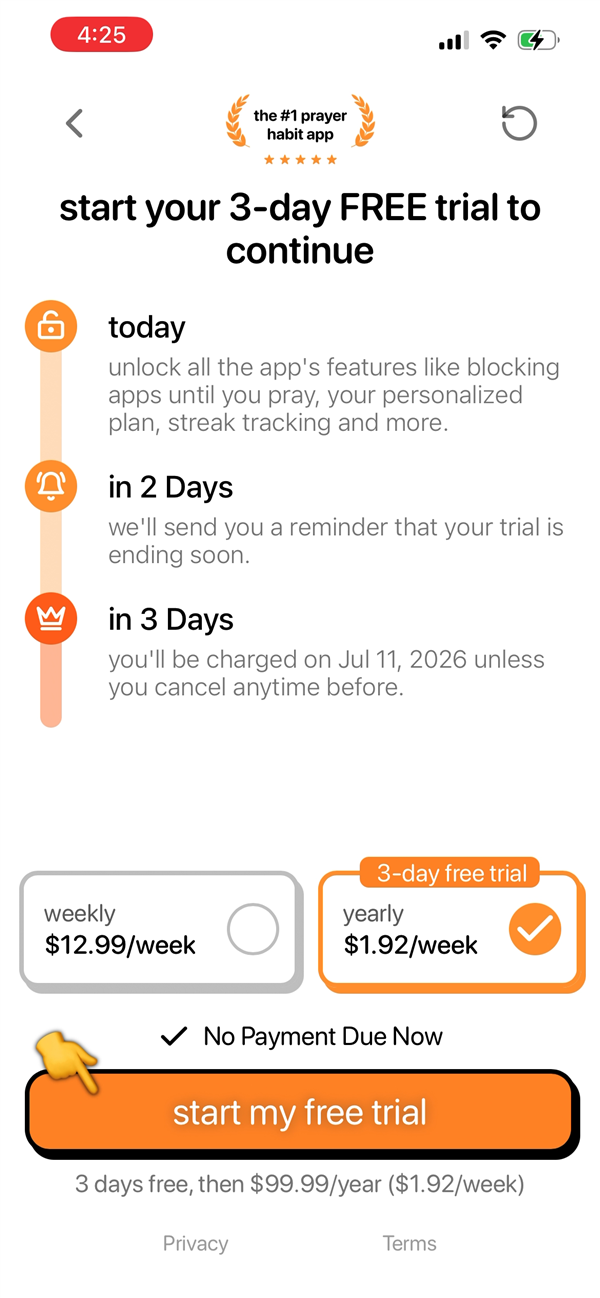
After onboarding, PrayerLock presents a hard paywall: "start your 3-day FREE trial to continue." Two options are shown — weekly at $12.99/week, and yearly, pre-selected, headlined in large orange text as $1.92/week. The actual amount you'd be charged — $99.99/year — appears only once, in smaller gray text below the button: "3 days free, then $99.99/year ($1.92/week)."
Step 2: Apple's Own Confirmation Screen Is Clear
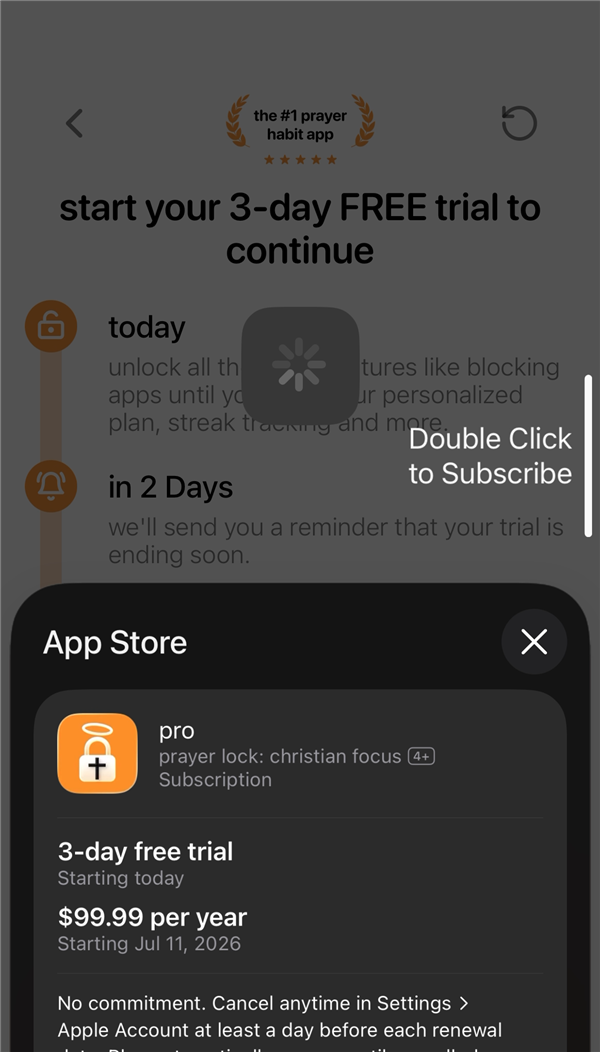
Tapping "start my free trial" opens Apple's own native purchase confirmation — not something PrayerLock built. This screen is unambiguous: "3-day free trial, Starting today" and "$99.99 per year, Starting Jul 11, 2026," with a clear cancellation policy. Whatever happens on PrayerLock's own paywall screen, Apple's checkout itself is transparent.
Step 3: Backing Out Surfaces a "One Time Offer"
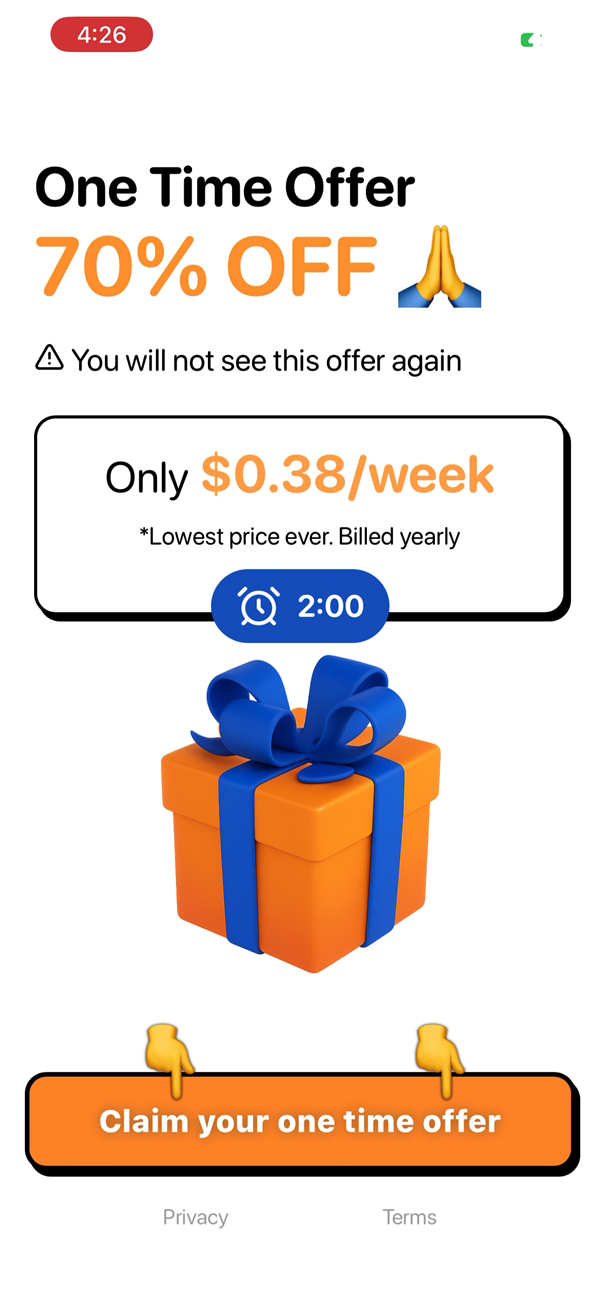
Closing that Apple sheet — rather than confirming — doesn't return to the paywall. It surfaces a new screen: "One Time Offer — 70% OFF," with a warning icon reading "You will not see this offer again," a price of "Only $0.38/week *Lowest price ever. Billed yearly," and a live countdown timer that started at two minutes.
Step 4: This Offer Has No Trial
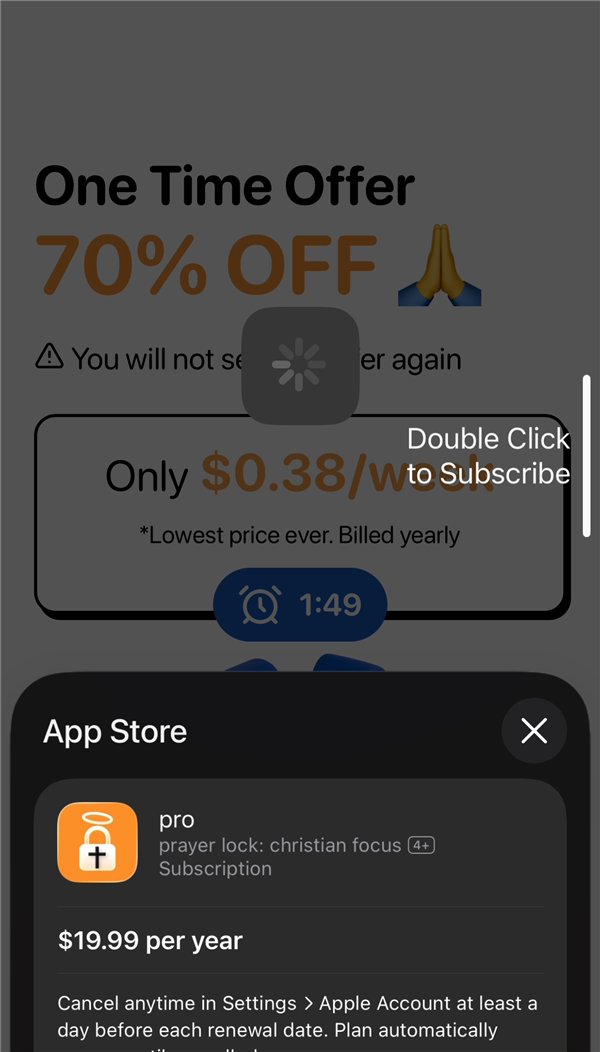
Tapping through to claim the discount opens a second Apple confirmation sheet. This one shows "$19.99 per year" — full stop. No "3-day free trial" line, no "starting today." Compare this directly to Step 2's sheet, which explicitly listed the trial before the price. Declining the default $99.99/year plan to chase the 70%-off offer means giving up the trial entirely — you're charged $19.99 immediately.
Step 5: The Offer Reappears
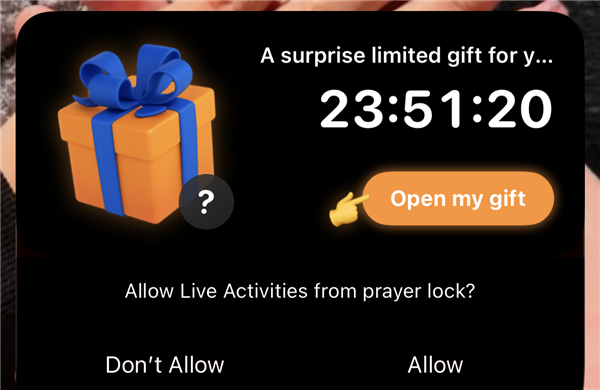
Later that day, after fully leaving the app and locking the phone, this Live Activity notification appeared on the lock screen: "A surprise limited gift for you," with a fresh countdown — captured here at 23 hours, 51 minutes remaining — and an "Open my gift" button. Tapping it leads back to the identical $19.99/year offer declined minutes earlier in Step 3.
Two things follow directly from this: the offer was, in fact, seen again — contradicting the warning in Step 3 — and the original two-minute countdown wasn't a hard deadline. Nothing happened when it reached zero; the same discount was simply offered again, hours later, framed as a fresh, time-limited surprise.
For Context
We're not going to tell you what conclusion to draw from this. But it's worth knowing that some of what's described above overlaps with categories regulators and Apple have separately named. The FTC's 2022 report on dark patterns, Bringing Dark Patterns to Light, specifically defines "baseless countdown timers" — timers on offers that aren't actually time-limited — as a named pattern. Apple has separately required that a subscription's full price be shown at least as prominently as any per-week or per-month figure, rather than a small-print afterthought. Whether any particular screen here fits those definitions is something you're in a better position to judge than we are — we've just described exactly what we saw.
Where Pistis Is Different
We built Pistis's pricing to be boring by comparison. One price, shown in full, before you ever reach a payment screen. No countdown. No "one time" offer that reappears. No trial that quietly disappears if you don't take the first option offered. If that's the kind of business you'd rather subscribe to, see how Pistis compares to PrayerLock — or join the waitlist.
Waitlist
Continue the practice.
Pistis is coming to iOS. Join the waitlist and receive founding member pricing — $34.99/year instead of the regular $44.99.
Founding member pricing ends December 31, 2026. Every plan starts with a 7-day free trial. Card required upfront.
No spam. No newsletters. One email when the app is ready. See our Privacy Policy.